ShopsUI
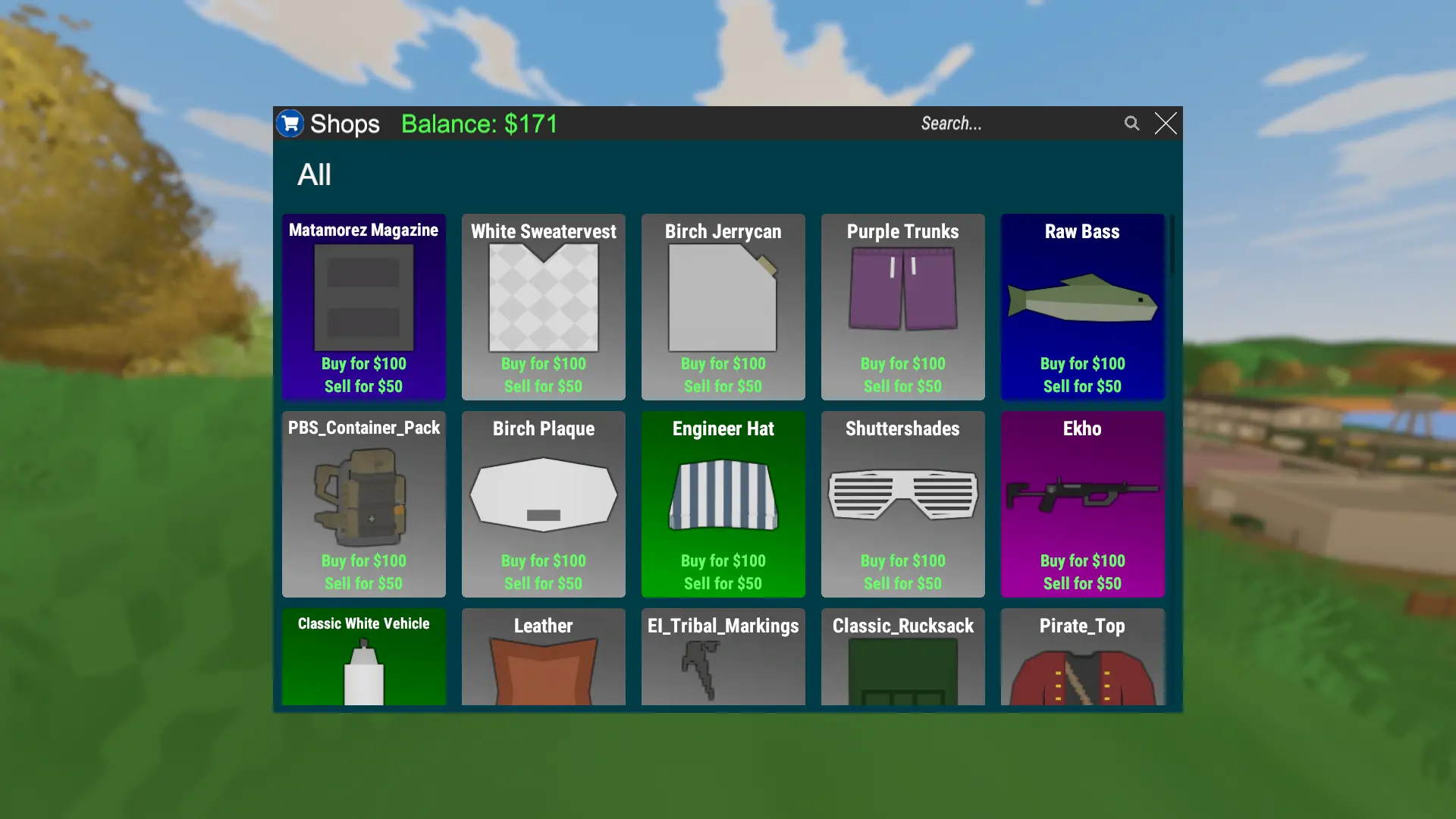
ShopsUI is a plugin for Unturned that adds item shops, vehicle shops, searchable shop UI, category browsing, direct buy/sell commands, and a virtual sellbox for quick inventory selling.
Players can browse shops through UI or use commands directly. Server owners can manage shops in-game, restrict shops by RocketMod permissions, organize listings into categories, and migrate from ZaupShops.
Features
- Searchable item shop UI with category buttons, buy buttons, sell buttons, logo support, and balance display.
- Searchable vehicle shop UI with category buttons and vehicle purchase buttons.
- Direct player commands for buying, selling, and checking prices.
- Admin commands for creating, removing, ordering, and reloading item and vehicle shops.
- Shop categories for organizing item and vehicle listings.
- Whitelist and blacklist support using RocketMod permission groups.
- Virtual
/sellboxstorage for bulk selling items with a confirmation UI. - MySQL storage with automatic table creation on plugin load.
- Uconomy economy integration through a configurable currency label.
- ZaupShops migration command for moving legacy shops into ShopsUI.
UI
Requirements
- RocketMod-compatible Unturned server.
- MySQL or MariaDB database.
- Uconomy installed and configured.
- ShopsUI UI effects installed on the server/client as required by your server setup.
Installation
- Make sure Uconomy is installed and working.
- Make sure Unturned Images RocketMod is installed.
- Install ShopsUI using the plugin loader and this workshop mod.
- Start the server so the default configuration and translations are generated.
- Edit the generated ShopsUI configuration and set the MySQL connection string.
- Restart the server.
- Grant player and admin permissions.
- Restart the server or run
/shop reloadafter changing shop data.
The plugin creates its required MySQL tables automatically during load.
Player Commands
| Command | Permission | Description |
|---|---|---|
/shop |
ShopsUI.commands.shop |
Opens the item shop UI. |
/vshop |
ShopsUI.commands.vshop |
Opens the vehicle shop UI. |
/buy <item> [amount] |
ShopsUI.commands.buy |
Buys an item. |
/sell <item> [amount] |
ShopsUI.commands.sell |
Sells an item from inventory. |
/cost <item> [amount] |
ShopsUI.commands.cost |
Shows item buy/sell price. |
/vbuy <vehicle> |
ShopsUI.commands.vbuy |
Buys and spawns a vehicle. |
/vcost <vehicle> |
ShopsUI.commands.vcost |
Shows vehicle price. |
/sellbox |
ShopsUI.commands.sellbox |
Opens virtual storage for bulk selling. |
Aliases:
/shop:/shops,/ishop,/ishops,/itemshop,/itemshops/vshop:/vshops,/vehicleshop,/vehicleshops/buy:/ibuy,/itembuy,/buyi,/buyitem/sell:/isell,/itemsell,/selli,/sellitem/cost:/icost,/itemcost,/costi,/costitem/vbuy:/vehiclebuy,/buyv,/buyvehicle/vcost:/vehiclecost,/costv,/costvehicle/sellbox:/sbox
Player examples:
/shop
/vshop
/buy 363 5
/sell maple_rifle 2
/cost 363 10
/vbuy hummingbird
/vcost 93
/sellbox
Item and vehicle arguments can be numeric asset IDs, GUIDs, or asset names where supported by Unturned asset lookup.
Admin Commands
Opening the item shop UI with /shop requires ShopsUI.commands.shop. All item shop admin subcommands require ShopsUI.commands.shop.*.
Opening the vehicle shop UI with /vshop requires ShopsUI.commands.vshop. All vehicle shop admin subcommands require ShopsUI.commands.vshop.*.
Item Shops
| Command | Description |
|---|---|
/shop add <buy|sell> <item> <price> |
Adds or updates an item buy or sell price. |
/shop remove <buy|sell> <item> |
Removes an item buy or sell price. |
/shop order <item> <order> |
Sets item listing order. |
/shop reload |
Reloads shop data from MySQL. |
/shop whitelist <add|rem> <item> <permission> |
Adds/removes an item whitelist group. |
/shop blacklist <add|rem> <item> <permission> |
Adds/removes an item blacklist group. |
/shop category create <category> |
Creates an item category. |
/shop category delete <category> |
Deletes an item category. |
/shop category add <category> <shops> |
Adds item shops to a category. |
/shop category remove <category> <shops> |
Removes item shops from a category. |
/shop migrate |
Migrates shops from ZaupShops. Run twice within 30 seconds to confirm. |
Item admin examples:
/shop add buy 363 250
/shop add sell 363 75
/shop remove sell 363
/shop order 363 10
/shop whitelist add 363 vip
/shop blacklist add 363 prisoner
/shop category create Rifles
/shop category add Rifles 363,297
/shop reload
/shop migrate
Vehicle Shops
| Command | Description |
|---|---|
/vshop add <vehicle> <price> |
Adds or updates a vehicle buy price. |
/vshop remove <vehicle> |
Removes a vehicle shop. |
/vshop order <vehicle> <order> |
Sets vehicle listing order. |
/vshop reload |
Reloads shop data from MySQL. |
/vshop whitelist <add|rem> <vehicle> <permission> |
Adds/removes a vehicle whitelist group. |
/vshop blacklist <add|rem> <vehicle> <permission> |
Adds/removes a vehicle blacklist group. |
/vshop category create <category> |
Creates a vehicle category. |
/vshop category delete <category> |
Deletes a vehicle category. |
/vshop category add <category> <shops> |
Adds vehicle shops to a category. |
/vshop category remove <category> <shops> |
Removes vehicle shops from a category. |
Vehicle admin examples:
/vshop add 93 5000
/vshop add hummingbird 15000
/vshop remove 93
/vshop order 93 5
/vshop whitelist add 93 vip
/vshop category create Helicopters
/vshop category add Helicopters 93
/vshop reload
Permissions
Recommended player permissions:
<Permission Cooldown="0">ShopsUI.commands.shop</Permission>
<Permission Cooldown="0">ShopsUI.commands.vshop</Permission>
<Permission Cooldown="0">ShopsUI.commands.buy</Permission>
<Permission Cooldown="0">ShopsUI.commands.sell</Permission>
<Permission Cooldown="0">ShopsUI.commands.cost</Permission>
<Permission Cooldown="0">ShopsUI.commands.vbuy</Permission>
<Permission Cooldown="0">ShopsUI.commands.vcost</Permission>
<Permission Cooldown="0">ShopsUI.commands.sellbox</Permission>
Recommended admin permissions:
<Permission Cooldown="0">ShopsUI.commands.shop</Permission>
<Permission Cooldown="0">ShopsUI.commands.shop.*</Permission>
<Permission Cooldown="0">ShopsUI.commands.vshop</Permission>
<Permission Cooldown="0">ShopsUI.commands.vshop.*</Permission>
/shop and /vshop check these permissions manually in code. The .* permissions are the exact strings required by the admin subcommand checks; the base permissions are still needed if admins should also open the shop UIs without arguments.
Shop group permissions use this format:
ShopsUI.groups.<name>
For example, if you run /shop whitelist add 363 vip, players need this RocketMod permission to access that shop:
<Permission Cooldown="0">ShopsUI.groups.vip</Permission>
Configuration
Default configuration example:
<ShopsUIConfiguration>
  <Database>
    <DatabaseType>LiteDB</DatabaseType>
    <MySqlConfiguration>
      <ServerAddress>127.0.0.1</ServerAddress>
      <ServerPort>3306</ServerPort>
      <Username>unturned</Username>
      <Password>password</Password>
      <DatabaseName>openmod</DatabaseName>
      <ConnectionString />
    </MySqlConfiguration>
  </Database>
  <Shops>
    <BlacklistEnabled>false</BlacklistEnabled>
    <WhitelistEnabled>false</WhitelistEnabled>
    <DefaultCategory>
      <Items>
        <Enabled>true</Enabled>
        <Name>All</Name>
      </Items>
      <Vehicles>
        <Enabled>true</Enabled>
        <Name>All</Name>
      </Vehicles>
    </DefaultCategory>
  </Shops>
  <Sellbox>
    <Width>8</Width>
    <Height>6</Height>
  </Sellbox>
  <SellboxSizes>
    <SellboxSizeConfiguration>
      <GroupPermission>ShopsUI.groups.vip</GroupPermission>
      <Width>10</Width>
      <Height>12</Height>
    </SellboxSizeConfiguration>
  </SellboxSizes>
  <UI>
    <ShopsEffect>29300</ShopsEffect>
    <SellBoxEffect>29400</SellBoxEffect>
    <LogoUrl>https://i.imgur.com/t6HbFTN.png</LogoUrl>
    <BackgroundsEnabled>true</BackgroundsEnabled>
    <ButtonDelay>1</ButtonDelay>
    <CategoryButtonDelay>0.2</CategoryButtonDelay>
    <ShowEmptyCategories>false</ShowEmptyCategories>
    <ShowSellOnlyShops>true</ShowSellOnlyShops>
    <DisplayDelay>0.5</DisplayDelay>
    <DisplayAmount>10</DisplayAmount>
  </UI>
  <Economy>
    <Provider>Uconomy</Provider>
    <CurrencySymbol>$</CurrencySymbol>
    <CurrencyName>Credits</CurrencyName>
  </Economy>
</ShopsUIConfiguration>
Configuration options:
| Option | Description |
|---|---|
Database.DatabaseType |
Database provider. Use LiteDB or MySql. Defaults to LiteDB. |
Database.MySqlConfiguration.ServerAddress |
MySQL host used when DatabaseType is MySql. |
Database.MySqlConfiguration.ServerPort |
MySQL port used when DatabaseType is MySql. |
Database.MySqlConfiguration.Username |
MySQL username used when DatabaseType is MySql. |
Database.MySqlConfiguration.Password |
MySQL password used when DatabaseType is MySql. |
Database.MySqlConfiguration.DatabaseName |
MySQL database name used when DatabaseType is MySql. |
Database.MySqlConfiguration.ConnectionString |
Optional base MySQL connection string. Explicit MySQL fields still override server, port, username, password, and database. |
Shops.BlacklistEnabled |
Enables blacklist checks for item and vehicle shops. |
Shops.WhitelistEnabled |
Enables whitelist checks for item and vehicle shops. |
Shops.DefaultCategory.Items.Enabled |
Shows an automatic item category containing all item shops. |
Shops.DefaultCategory.Items.Name |
Name of the automatic item category. |
Shops.DefaultCategory.Vehicles.Enabled |
Shows an automatic vehicle category containing all vehicle shops. |
Shops.DefaultCategory.Vehicles.Name |
Name of the automatic vehicle category. |
Sellbox.Width |
Default sellbox storage width. Set 0 to disable default sellbox size. |
Sellbox.Height |
Default sellbox storage height. Set 0 to disable default sellbox size. |
SellboxSizes[].GroupPermission |
Exact RocketMod permission that unlocks an override sellbox size. No ShopsUI.groups. prefix is added automatically. |
SellboxSizes[].Width |
Sellbox width for players with the override permission. |
SellboxSizes[].Height |
Sellbox height for players with the override permission. |
UI.ShopsEffect |
Effect ID for the item/vehicle shop UI. |
UI.SellBoxEffect |
Effect ID for the sellbox confirmation UI. |
UI.LogoUrl |
Logo image URL shown in the UI. Leave empty to skip logo image assignment. |
UI.BackgroundsEnabled |
Reserved UI background toggle. |
UI.ButtonDelay |
Reserved delay value for shop buttons. |
UI.CategoryButtonDelay |
Reserved delay value for category buttons. |
UI.ShowEmptyCategories |
Reserved empty-category display toggle. |
UI.ShowSellOnlyShops |
Reserved sell-only item shop display toggle. |
UI.DisplayDelay |
Reserved UI display delay value. |
UI.DisplayAmount |
Reserved listing display amount value. |
Economy.Provider |
Economy provider name. Current implementation targets Uconomy. |
Economy.CurrencySymbol |
Symbol displayed in messages and UI. |
Economy.CurrencyName |
Currency name displayed in messages and UI. |
Whitelist And Blacklist Behavior
Whitelist and blacklist entries store the permission suffix only, such as vip, but they check the full RocketMod permission ShopsUI.groups.vip.
If WhitelistEnabled is false and BlacklistEnabled is false, all shops are available to everyone with the command permission.
If whitelist is enabled and a shop has whitelist entries, players must have at least one matching ShopsUI.groups.<name> permission.
If blacklist is enabled and a shop has blacklist entries, players with a matching ShopsUI.groups.<name> permission are blocked.
If both systems are enabled and a shop has whitelist entries, the whitelist is the stricter access rule for that shop.
Categories
Categories organize item and vehicle listings in the UI.
Category names are currently parsed as single command arguments. Use names like Rifles, Medical, Vehicles, or VIP instead of names with spaces.
Category shop lists accept comma-separated asset references and numeric ranges. Numeric asset IDs and GUIDs are supported by the parser.
Examples:
/shop category create Food
/shop category add Food 13,14,95
/shop category remove Food 95
/vshop category create Cars
/vshop category add Cars 33,34,35
Sellbox
The sellbox lets players sell many items at once.
Flow:
- Player runs
/sellboxor/sbox. - A temporary storage container opens.
- Player places items into the storage and closes it.
- Unsellable or unauthorized items are returned immediately.
- A confirmation UI shows sellable items and total value.
- Player clicks confirm to sell, or cancel/close to return remaining items.
If default sellbox width or height is 0, /sellbox is disabled unless the player has a matching configured sellbox size override permission.
Sellbox size override permissions are checked exactly as written in SellboxSizes[].GroupPermission. For example, if the config value is ShopsUI.groups.vip, the player needs ShopsUI.groups.vip; if the value is vip, the player needs vip.
ZaupShops Migration
Use /shop migrate to migrate from ZaupShops.
The command has a safety confirmation. Run it once to receive the warning, then run it again within 30 seconds to start migration.
/shop migrate
/shop migrate
Migration can replace existing ShopsUI shop data. Back up your database before running it on a production server.
If group permissions are migrated, replace old permissions like zaupgroup.vip or zaupgroups.vip with ShopsUI.groups.vip.
Database Tables
When DatabaseType is LiteDB, data is stored in shopsui.db inside the plugin directory. The LiteDB file name is fixed by the plugin.
When DatabaseType is MySql, ShopsUI creates and uses these tables:
| Table | Purpose |
|---|---|
ShopsUI_ItemShops |
Item buy/sell prices and display order. |
ShopsUI_VehicleShops |
Vehicle buy prices and display order. |
ShopsUI_ItemCategories |
Item category names. |
ShopsUI_VehicleCategories |
Vehicle category names. |
ShopsUI_ItemGroups |
Item shop whitelist/blacklist entries. |
ShopsUI_VehicleGroups |
Vehicle shop whitelist/blacklist entries. |
ShopsUI_ItemShopCategories |
Item shop to category links. |
ShopsUI_VehicleShopCategories |
Vehicle shop to category links. |
Shop IDs are stored as asset GUID strings.
Translations
Translations file is huge so not all the translations are included. Here are some examples:
| Key | Default |
|---|---|
commands.success.item_bought |
You have bought x{Amount} {ItemAsset.FriendlyName} for {CurrencySymbol}{Price:0.00}. Your balance is now {CurrencySymbol}{Balance:0.00}. |
commands.success.item_sold |
You have sold x{Amount} {ItemAsset.FriendlyName} for {CurrencySymbol}{Price:0.00}. Your balance is now {CurrencySymbol}{Balance:0.00}. |
commands.success.vehicle_bought |
You have bought a {VehicleAsset.FriendlyName} for {CurrencySymbol}{Price:0.00}. Your balance is now {CurrencySymbol}{Balance:0.00}. |
commands.success.sellbox_sold |
You have sold {TotalAmount} items for {CurrencySymbol}{TotalPrice:0.00}. {ReturnedAmount} have been returned to you. |
commands.errors.no_sellbox |
You cannot use /sellbox. |
commands.errors.not_permitted_item |
You are not permitted to buy/sell {ItemAsset.FriendlyName}. |
commands.errors.not_permitted_vehicle |
You are not permitted to buy {VehicleAsset.FriendlyName}. |
transactions.no_balance |
You don't have enough balance to purchase {Amount} {Name} for {CurrencySymbol}{Price:0.00}. |
ui.header |
Shops <color=#4FFF4F>Balance: {CurrencySymbol}{Balance:0.##}</color> |
ui.search |
Search... |
ui.sellbox.header |
Sell Box |
ui.sellbox.confirm |
Sell Items for {CurrencySymbol}{TotalSellPrice:0.##} |
Notes And Limitations
- The current economy implementation targets Uconomy.
- Category names in commands should not contain spaces.
- UI notifications currently use chat messages for some actions.
- Some UI config values are reserved for parity with the original ShopsUI behavior and may depend on the installed UI effect package.
- Vehicle purchases spawn the vehicle near the player and set the buyer as owner.
Quick Setup Example
This example creates a basic item and vehicle shop setup:
/shop add buy 363 250
/shop add sell 363 75
/shop add buy 15 100
/shop add sell 15 25
/shop category create Weapons
/shop category add Weapons 363,15
/vshop add 93 5000
/vshop category create Helicopters
/vshop category add Helicopters 93
/shop reload
Grant these permissions to normal players:
<Permission Cooldown="0">ShopsUI.commands.shop</Permission>
<Permission Cooldown="0">ShopsUI.commands.vshop</Permission>
<Permission Cooldown="0">ShopsUI.commands.buy</Permission>
<Permission Cooldown="0">ShopsUI.commands.sell</Permission>
<Permission Cooldown="0">ShopsUI.commands.cost</Permission>
<Permission Cooldown="0">ShopsUI.commands.vbuy</Permission>
<Permission Cooldown="0">ShopsUI.commands.vcost</Permission>
<Permission Cooldown="0">ShopsUI.commands.sellbox</Permission>